
Let discovery run itself
MDBList is the easiest way in this stack to keep movies and shows flowing in automatically while Sonarr and Radarr still enforce all the real download rules.
Use MDBList for
Movies, TV series, anime, anticipation lists, best-rated lanes, and streaming-heavy discovery that should automatically feed into ARR.
Do not use it for
Lidarr music discovery. Keep music on music-oriented sources such as Last.fm and Headphones instead.
Use it for
Movies, shows, anime, streaming lanes, and best-rated discovery flows.
Sync speed
In this guide’s live reference setup, ARR checks import lists every 5 minutes.
Do not confuse it with
Lidarr music-list sources, which should stay music-specific.
This page explains why mdblist.com is one of the easiest ways to automate discovery for Radarr and Sonarr, and how it fits into the rest of the ARR stack.
Why MDBList is Useful
MDBList is a dynamic list builder.
Instead of manually adding every new movie or show inside Radarr or Sonarr, you can:
- define the type of content you want
- let
MDBListkeep the list fresh - let ARR import that list automatically
That makes MDBList the discovery layer, while ARR remains the automation and download layer.
Official Compatibility
Official MDBList docs say you can add MDBList list URLs directly to:
RadarrSonarrversion4
They do not document direct Lidarr support. In this setup, MDBList is the discovery layer for movies and shows, while Lidarr should use music-oriented import-list sources instead.
Sources:
- MDBList to Radarr
- MDBList Sonarr integration
- MDBList overview
- Lidarr features: import lists from Last.fm and Headphones
How ARR Uses the Lists
In the live reference setup used for this guide:
Sonarr Import List Syncruns every5 minutesRadarr Import List Syncruns every5 minutes
That means when a new title is added to one of your MDBList lists:
- ARR sees it on the next import-list sync
- the movie or series is added to the correct library
- ARR applies your normal root-folder, profile, monitoring, and language rules
- RSS or search logic takes over and looks for matching releases
- the downloader grabs the release
- ARR imports it and
Plexpicks it up
In this guide’s live reference setup, the related background timing is:
Sonarr RSS Sync = every 15 minutesRadarr RSS Sync = every 30 minutes
So list import is fast, and grabbing follows your existing search/RSS behavior.
Recommended MDBList Sample Lineup
This kind of lineup breaks down nicely into movie and TV lanes.
The descriptions below use a practical sample lineup based on the real setup shown here. The exact filter logic still lives inside MDBList, so if you later tighten or broaden a filter there, the list behavior changes without you having to rewrite ARR itself.
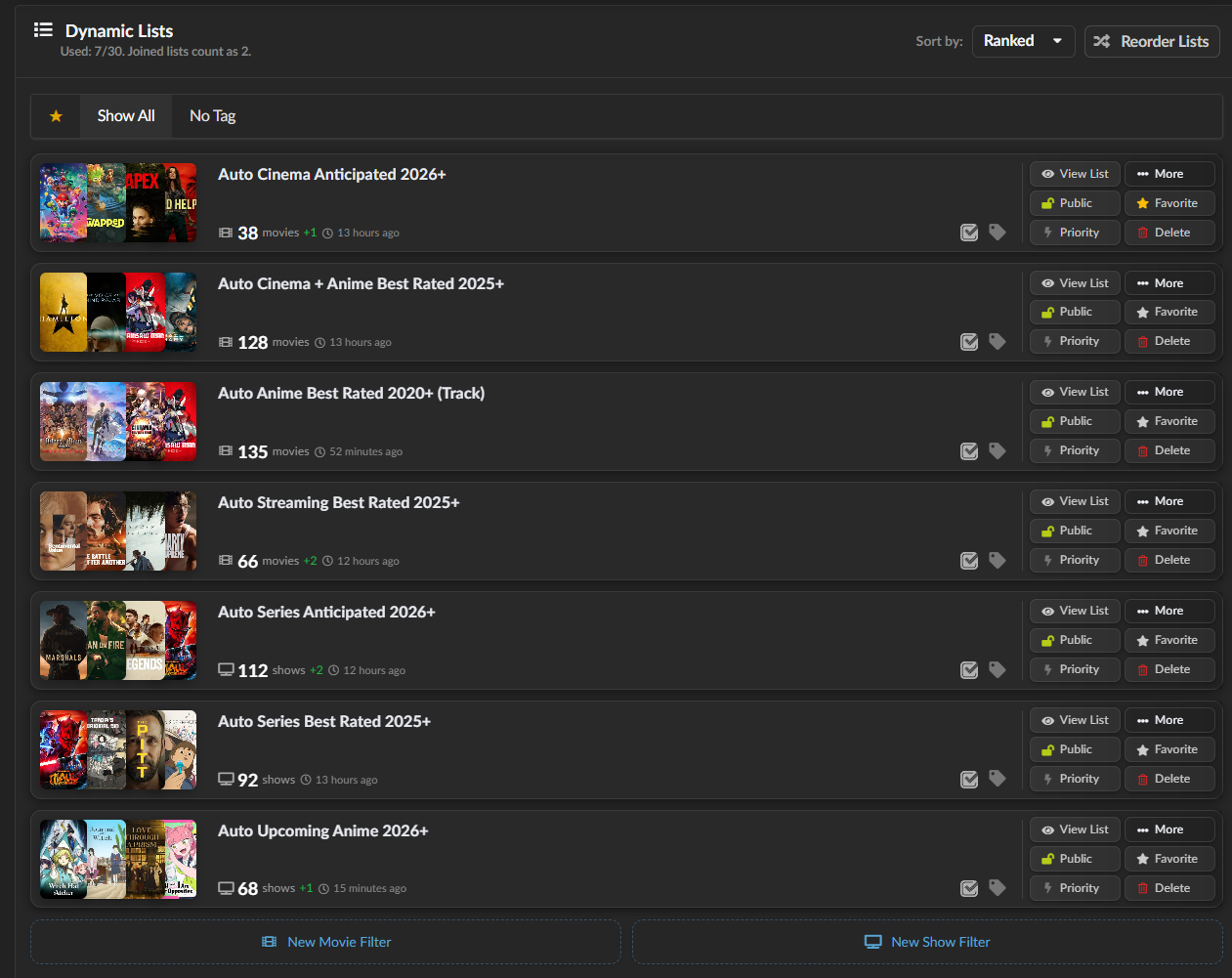
Example of a practical MDBList dynamic-list dashboard you can use as inspiration for your own setup.
Quick List Overview
| List | ARR App | What it is for | What happens when it updates |
|---|---|---|---|
Auto Cinema Anticipated 2026+ |
Radarr |
upcoming cinema-focused movies from 2026 onward |
new movie is added to Radarr, monitored, then handled by your normal movie rules |
Auto Cinema + Anime Best Rated 2025+ |
Radarr |
highly rated modern movies including anime films | new movie is imported, then your language, quality, and size rules decide what gets grabbed |
Auto Anime Best Rated 2020+ (Track) |
Radarr |
anime-heavy movie discovery from 2020 onward |
new title enters Radarr and follows your anime-friendly movie logic |
Auto Streaming Best Rated 2025+ |
Radarr |
strong streaming-first movie discovery | new title lands in Radarr quickly and follows the compact 1080p movie setup |
Auto Series Anticipated 2026+ |
Sonarr |
anticipated new shows from 2026 onward |
new series is added to Sonarr and monitored under your TV rules |
Auto Series Best Rated 2025+ |
Sonarr |
highly rated newer series | new series enters Sonarr and follows your 720p-first series setup |
Auto Upcoming Anime 2026+ |
Sonarr |
upcoming anime series | new anime series is added to Sonarr and handled by your anime/series rules |
Radarr Lists
Auto Cinema Anticipated 2026+
- purpose: anticipated cinema-oriented movies from
2026onward - best use: keep
Radarraware of upcoming theatrical titles early - behavior: new titles added to this list are imported by
Radarron the next list sync and then monitored under your normal movie rules
Auto Cinema + Anime Best Rated 2025+
- purpose: highly rated modern movies from
2025onward, including anime films - best use: quality-focused movie discovery instead of raw popularity chasing
- behavior: new titles feed into
Radarras soon as they appear, then your language and size rules decide what gets grabbed
Auto Anime Best Rated 2020+ (Track)
- purpose: strong anime-heavy movie discovery from
2020onward - best use: keep a dedicated anime-friendly movie lane without mixing everything into one giant general list
- behavior:
Radarrimports new entries, then your movie custom formats decide which audio, subtitle, and quality preferences win
Auto Streaming Best Rated 2025+
- purpose: strong streaming-first or digital-first movie titles from
2025onward - best use: catch platform-driven releases faster than waiting for theatrical-only discovery
- behavior: new entries move into
Radarr, where your compact1080pand language rules take over
Sonarr Lists
Auto Series Anticipated 2026+
- purpose: anticipated TV series starting in
2026and later - best use: build a future pipeline of shows you want
Sonarrto monitor automatically - behavior: when a new show appears,
Sonarrimports it on the next sync and applies your series profile and language rules
Auto Series Best Rated 2025+
- purpose: highly rated newer series from
2025onward - best use: a quality-first TV discovery lane
- behavior: new entries are added to
Sonarr, then your720p-first and fallback logic handles the eventual downloads
Auto Upcoming Anime 2026+
- purpose: upcoming anime series from
2026onward - best use: give
Sonarra dedicated anime discovery stream - behavior: once imported, the show follows your Sonarr anime/series handling, language scoring, and delayed
720pstrategy
What Happens When a List Updates
If an MDBList dynamic list gains a new item:
- ARR notices it on the next import-list sync
- the item is added to your library in a monitored state
- future grabs are controlled by:
- quality profiles
- custom formats
- language scoring
- indexer priorities
- downloader categories
So MDBList does not replace ARR logic.
It feeds ARR better input.
That is exactly why it works so well in a beginner-friendly setup.
Why This is Simpler Than Manual Adding
Without MDBList, you often have to:
- search for new titles manually
- decide what belongs in
SonarrvsRadarr - keep checking release calendars yourself
With MDBList:
- the list stays alive on its own
- ARR keeps importing new entries
- your existing rules keep everything consistent
It is one of the cleanest ways to build a mostly automated media pipeline without making the setup feel like a second job.
Recommended Operating Model
Use MDBList to answer:
- what movies and shows should be tracked
Use Sonarr and Radarr to answer:
- how should it be downloaded
Use Lidarr to answer:
- how should music be tracked and downloaded
Use Plex to answer:
- how should it be presented
That separation makes the stack much easier to understand and maintain.